
Choosing the right invoicing software as a photographer isn't just about legal compliance. It's about taking control of your business: understanding what works, saving time, and stop flying blind.
When you're starting out in photography, invoicing is often an uncomfortable topic.
Not because you don't know how to do it, but because asking for money in black and white, with an official invoice, makes things real. You're no longer "just" taking photos. You're selling a service.
In real life, many photographers delay this moment:
- sending invoices late
- almost apologizing when attaching them
- creating them hastily in a corner
And that's normal. But at some point, this makeshift approach reaches its limits.
📋 Table of Contents
- In the beginning, DIY solutions... were acceptable
- Today, invoicing is no longer a "secondary" matter
- What we often forget: invoicing isn't just about asking for money
- The main ways to manage your invoicing (and their limitations)
- Comparison table: which tool for which need?
- Invoicing as a management tool (not a constraint)
- Where Fotostudio fits in
- In conclusion
- FAQ – Essential invoicing questions for photographers
In the beginning, DIY solutions... were acceptable
A few years ago, creating an invoice in Word or Excel didn't shock anyone.
As long as:
- numbering existed more or less
- clients paid
- tax authorities didn't look too closely
In practice, many photographers started this way. And some still operate like this today.
The problem isn't the DIY approach itself. It's that the legal framework has changed.
Today, invoicing is no longer a "secondary" matter
With the progressive arrival of mandatory electronic invoicing in many countries, tolerance for "good enough" is disappearing.
Without going into legal details, one thing is clear:
- non-compliant invoices
- inconsistent numbering
- missing documents
...it's no longer just an inconvenience. It's a risk.
And many photographers realize this too late, often when:
- facing an audit
- changing business status
- their business really starts growing
What we often forget: invoicing isn't just about asking for money
When we talk about invoicing software for photographers, we immediately think of:
- compliance
- VAT
- legal requirements
But in reality, the real benefit is elsewhere.
In real life, good invoicing software mainly helps you:
- see your revenue effortlessly
- understand which sessions really pay off
- identify slow or busy periods
- compare your offerings
Without this, you work... but you're flying blind.
Many photographers say:
"I work a lot, but I don't really know what works best."
The answer often lies in this lack of visibility.
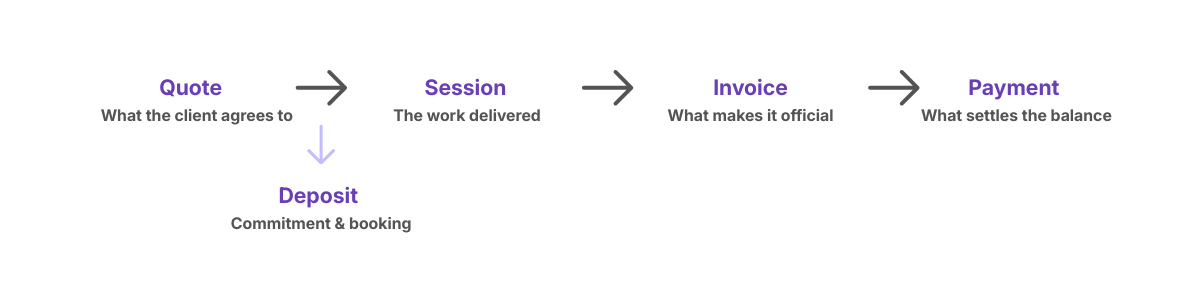
A good invoicing software creates a logical continuity between quotes, delivery, invoicing and payment collection
The main ways to manage your invoicing (and their limitations)
There's no universal method. There are coherent choices depending on your stage.
1. The ultra-manual approach
Word, Excel, editable PDFs.
On paper, these tools remain authorized, regardless of your business status (sole proprietor, LLC, or other). The law doesn't require specific software.
In practice, this can work at the very beginning, when:
- you issue very few invoices
- you perfectly control your numbering
- you find each document effortlessly
But this model entirely depends on your personal discipline.
Excel can be enough... as long as no one asks you to prove you haven't modified anything.
And that's where things get complicated.
The real problem isn't creating the invoice. It's what comes after:
• ensuring invoices are tamper-proof
• maintaining consistent traceability over time
• being able to justify everything in case of an audit
As business grows (and with the arrival of electronic invoicing) this way of working becomes fragile.
You don't just lose time. You lose reliability, visibility... and peace of mind.
2. General invoicing software
SumUp Invoices, Zervant, Debitoor (now SumUp), etc.
These general invoicing software solutions are often reassuring:
- legally compliant
- reasonably priced
- designed for admin tasks
But in practice:
- no connection to your photo workflow
- no industry-specific insights into your business
- few or no useful metrics for decision-making
3. Accounting software (Sage, Xero, etc.)
Some photographers turn directly to accounting software like Sage, Xero, Zoho Books, or similar.
These tools are very solid, but you need to be clear about their role.
They're designed primarily for:
- accounting
- tax filing
- connecting with your accountant
Not for a photographer's daily workflow.
In real life, these are often:
- dense interfaces
- lots of accounting concepts
- powerful features... but not industry-oriented
They become relevant mainly if:
- your business is already well-structured
- you work with an accountant
- you want a central tool for finances
But for pure invoicing, the experience is often the same:
- heavier than necessary
- less fluid for sending quotes or invoices
- poorly connected to the reality of photo sessions
They're not "bad" tools. They're simply made for a different purpose.
4. Photography-specific tools
These industry-specific tools integrate invoicing, quotes, sometimes contracts and payments.
The benefit of the best photography invoicing software isn't "having more features". It's having logical continuity between:
- what you sell
- what you deliver
- what you invoice
- what you collect
And therefore, a much clearer view of your actual business.
Comparison table: which tool for which need?
| Criteria | Excel / Word | General Software (SumUp, Zervant, Debitoor) |
Photo-specific Tools (Fotostudio, other photo CRMs) |
Accounting Software (Sage, Xero, Zoho Books) |
|---|---|---|---|---|
| Monthly Price | Free | €8-25/month | €20-50/month | €30-100/month |
| Legal compliance | ⚠️ Manual management | ✅ Compliant | ✅ Compliant | ✅ Compliant |
| Invoice creation time | 10-15 min | 2-3 min | 1 min (pre-filled from quote) | 3-5 min |
| Quote → Invoice | ❌ Manual re-entry | ⚠️ Disconnected or basic | ✅ Automatic | ⚠️ Disconnected |
| Payment tracking | ❌ Separate spreadsheet | ✅ Automatic reminders | ✅ Reminders + session alerts | ✅ Bank reconciliation |
| Revenue analysis by service type | ❌ Manual formulas | ⚠️ Basic (by client) | ✅ By session, period, package | ✅ Analytical accounting |
| Deposit management | ❌ Manual calculation | ✅ Standard deposits | ✅ Deposits + automatic balance | ✅ Advanced |
| Calendar integration | ❌ No | ❌ No | ✅ Sessions linked to invoices | ❌ No |
| Client contracts | ❌ Separate document | ❌ Not included | ✅ Contract + quote + invoice | ❌ Not included |
| Accounting export | ⚠️ Manual | ✅ CSV, various formats | ✅ CSV, various formats | ✅ Native |
| Learning curve | Immediate | 1-2 hours | 2-4 hours | 1-2 days |
| Photography-specific support | ❌ N/A | ❌ General support | ✅ Understands the industry | ❌ General support |
How to read this table?
If you're starting out and issue less than 5 invoices/month → Excel can work temporarily, but watch compliance.
If you just want proper invoicing without connection to your business → General tools (SumUp, Zervant) are a good, affordable choice.
If you want to manage your business and save time across the entire chain → Photography-specific tools create logical continuity.
If you have an accountant or complex structure → Accounting software may be necessary, but they're oversized for most photographers.
Invoicing as a management tool (not a constraint)
When your invoicing is well-structured with the right photography invoicing software, you can finally answer simple but essential questions:
- Which type of session brings in the most?
- Am I charging enough for certain services?
- Where do I spend a lot of time for little value?
- Is my revenue actually growing?
Without these answers, you adjust your business based on feeling. With them, you adjust based on facts.
Managing deposits without complicating your life
In real life, few photographers invoice in one go.
Depending on the service type, we often see:
- a deposit at booking (studio session, portrait, corporate)
- multiple staggered payments (wedding, long reportage, complex projects)
On paper, it's simple. In practice, it gets complicated quickly:
- forgotten deposits
- unclear invoices for clients
- difficulty knowing what's paid or not
A good invoicing system should allow you to:
- manage one or multiple deposits
- keep a clear view of the remaining balance
- avoid manual calculations at each step
Without this, you lose time... and sometimes payments.
Payment reminders: an uncomfortable but essential topic
Following up with a client about late payment isn't pleasant for anyone.
Result: many photographers don't dare remind them, or do it too late.
In real life, late payments are rarely malicious. They mostly come from:
- forgetting
- a lost email
- unclear payment terms
Having clear, neutral, and sometimes automated reminders helps:
- preserve client relationships
- avoid tensions
- secure your cash flow
It's not about being firm. It's about having a framework.
Online payment: when invoices become actionable
Sending an invoice doesn't guarantee payment.
In real life, many delays come simply from:
- the client having to make a bank transfer
- finding account details
- remembering to do it later
Result: what should be paid "quickly" drags on.
Online payment completely changes this logic.
When an invoice or deposit can be paid immediately:
- the client acts while still engaged
- there's no friction
- there's no need for reminders
It's not about pressure. It's about simplicity.
For photographers, the benefits are very concrete:
- faster payments
- fewer reminders
- more predictable cash flow
And in many cases, a better client experience.
Invoicing additional products (prints, albums, options)
Invoicing isn't just about the session itself.
Many photographers also sell:
- prints
- albums
- additional files
- post-session options
Without the right tool, these sales often become:
- separate invoices
- makeshift additions
- or missed opportunities
A good system allows you to:
- easily add products after the fact
- maintain consistency between quote, invoice, and payment
- track what actually generates additional revenue
This is often where part of profitability hides.
Where Fotostudio fits in
Fotostudio isn't here to "revolutionize invoicing."
It starts from a simple observation: for a photographer, an invoice is never isolated. It's part of a whole:
- quotes
- sessions
- client documents
- payments
The tool becomes valuable when it helps you:
- stop re-entering the same information
- track your business without a separate spreadsheet
- maintain clear visibility without becoming an accountant
But if you only need to create a compliant invoice occasionally, other solutions may suffice.
In conclusion
Invoicing software for photographers isn't just an administrative tool.
It's:
• a marker of professionalization
• an aid to clarity
• and often, a trigger for better business management
The right choice isn't the one that does "the most". It's the one that lets you work peacefully, legally, and consciously.
FAQ – Essential invoicing questions for photographers
Is invoicing software mandatory for photographers?
No. The law doesn't require specific software. However, it does require compliant, traceable, and tamper-proof invoices. In practice, the more your business grows, the harder it becomes to guarantee this without tools.
Can I still invoice with Excel or Word?
Yes, in principle. But Excel can work... as long as no one asks you to prove you haven't modified anything. Over time, this approach becomes fragile, especially with electronic invoicing requirements.
Can I invoice without business registration?
No. As soon as you invoice for a service, you must be registered as a business. Invoicing without proper registration means operating professionally without a legal framework, even "just to test."
Does electronic invoicing really concern photographers?
Yes. Progressively, like all professionals in many countries. Even if not everything is mandatory immediately, practices and tools must evolve in this direction.
Is it different if I'm a sole proprietor?
Tax exemptions may simplify some requirements, but they don't exempt you from invoicing obligations. The expected rigor remains the same for numbering, storage, and traceability.
How do I handle VAT/sales tax as a photographer?
It depends on your status and revenue. Some photographers are VAT-exempt, others are subject to it. The most important thing is knowing your tax regime and applying the right framework consistently, especially as your business evolves.
What information must legally appear on an invoice?
Photographer and client identity, numbering, date, amounts, terms, VAT or exemption notice. The real risk isn't forgetting once, but not being consistent over time.
What numbering system should I adopt for invoices?
Invoices must follow numbering that is:
- unique
- chronological
- without gaps
The exact format matters less, as long as the logic is clear and constant over time. Problems appear when you change systems or modify after the fact.
How long should I keep invoices?
Invoices must be kept for several years (generally 7-10 years depending on jurisdiction), in a readable, durable, and unmodifiable format. The problem rarely appears immediately, but when you're asked to justify them.
Can I invoice deposits as a photographer?
Yes, and it's very common. A deposit at booking or multiple payments for a service (wedding, reportage, long projects) are perfectly legal, as long as everything is clear for the client.
Can I invoice multiple deposits for the same service?
Yes. It's common for weddings or extended projects. The important thing is keeping a simple view of what's paid, what remains, and when.
How to handle late payments without damaging client relationships?
Most delays come from forgetfulness, not ill will. Clear, neutral, and sometimes automated reminders are often enough to resolve the situation without tension.
Is online payment really useful for photographers?
In practice, yes. When payment is immediate and simple, there are fewer forgotten payments, fewer reminders, and more predictable cash flow. It's not pressure, it's facilitation.
Can I invoice products after the session (prints, albums, options)?
Yes. Many photographers do, but few have a truly smooth system for it. Yet this is often where part of profitability lies.
Should I use an all-in-one tool or separate tools?
There's no universal rule. A simple tool can work for occasional business. A more comprehensive tool becomes relevant when you want consistency, visibility, and less re-entry.
How do I know it's time to change invoicing tools?
Often when:
- you spend too much time on admin
- you no longer know exactly what's paid or not
- you lack visibility on your revenue
It's not about business size, but about friction.
Ready to simplify your invoicing?
Discover how Fotostudio can help you manage quotes, invoices, and payments in one place, while maintaining a clear view of your business.
Try for freeNo credit card required • 2 months free trial
